Close Alert Banner
Skip to Content

Orangeville Public Library Logo

View our account login pageAccount Login Contact Us
Hours and LocationsDonate Now
Account Login
  • Borrow and Learn
    • Audiobooks
    • Books and eBooks
    • Kids Stuff
    • Language and ESL
    • Learning and Research
    • Library Cards
    • Loan Periods and Fees
    • Local History and Genealogy
    • Magazines and Newspapers
    • Movies and TV
    • MyOPL Catalogue
    • Online Services A-Z
    • Passes and Things
    • Reading Suggestions
    • Request an Item
    • SmartSpots
  • Visit Us
    • Accessibility
    • Bus Passes and Garbage Tags
    • Computers and Printing
    • Exam Proctoring
    • Homebound Delivery Service
    • Hours and Locations
    • Makerspace
    • Print from Anywhere
    • Request a Reservation
    • Room Rentals
    • Tours and Outreach
  • Programs and Events
    • Adults
    • Tween and Teen
    • Kids
    • Battle of the Books
    • Events Calendar
    • News
    • Newsletters
    • Program Proposal
  • About Us
    • Contact Us
    • Friends of the Library
    • Hours and Locations
    • Library Board
    • Our History
    • Support the Library
    • Town of Orangeville

decorative banner with makerspace equipment on it

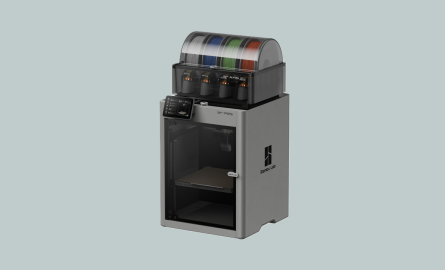
Bambu Lab P2S 3D Printer

  • Open new window to share this page via Facebook Facebook
  • Open new window to share this page via LinkedIn LinkedIn
  • Open new window to share this page via Twitter Twitter
  • Email this page Email
Search Options

prusa core one+ 3d printer


The Bambu P2S is a fast, enclosed 3D printer designed to make 3D printing easy, safe, and reliable for library users. It can create detailed, multi-coloured objects quickly and is well suited for a wide range of creative, educational, and practical projects. 

3D printing makes physical objects by building them layer by layer from a digital design file. These files can be found through online model libraries or created using beginner-friendly design tools such as MakerWorld and Tinkercad, as well as more advanced 3D design software. The printer uses filament, a spool of plastic material that is heated and passed through a nozzle to form each layer. Library users can use 3D printing to make models, replacement parts, craft items, prototypes, and learning projects, making it a useful tool for both exploration and problem-solving. 

Production cost:  

Use of the 3D Printer is free, but there is a cost associated with consuming the plastic filaments. Currently we are limiting the use of filaments for this printer to those purchased by the library.

  • Generic PLA filament- $1 per 25 grams used  


Learning Links:  

Written Guides 

Bambu Lab P2S User Wiki 

Bambu Lab AMS 2 Pro 


Video Guides 

Using Bambu Studio and MakerWorld 

Bambu Studio Tutorial Playlist 


For Staff 

P2S - YouTube 

3D Printing! - YouTube 

Bambu Lab Academy (requires free account) 


Contact Us

Subscribe to this page

Orangeville Library logo

Mill St. Library

1 Mill Street
Orangeville, ON
L9W 2M2
Open a Google Map


Hours of Operation

Alder St. Library

275 Alder Street
Orangeville, ON
L9W 5H6
Open a Google Map


Hours of Operation

How Did We Do?

Please take this opportunity to help us improve our service.

Share a Story

Customer Satisfaction Survey

survey form with faces

© 2020 Orangeville Public Library

AccessibilitySitemapWebsite FeedbackHours and LocationsContact Us

By GHD Digital

Close Old Browser Notification
Browser Compatibility Notification
It appears you are trying to access this site using an outdated browser. As a result, parts of the site may not function properly for you. We recommend updating your browser to its most recent version at your earliest convenience.